I tried AsteroidOS on Alpine Linux.
Alpine Linux from 3.21 include AsteroidOS packages in community repository.
My Japanese Blog "AsteroidOS" Tag Link
My Japanese Blog "Alpine" Tag Link
Use Environment
Windows 10 x64
VirtualBox 7.1 and 7.2
Alpine Linux 3.22 and edge
1.Alpine Linux install.
2.Enable community repository.
# vi /etc/apk/repositories
uncomment out community repository.
3.Install packages.
# apk update
repository refresh.
# apk add asteroid-launcher
Many dependent packages install too.
# apk add asteroid-alarmclock asteroid-btsyncd asteroid-calculator asteroid-calendar asteroid-camera asteroid-compass asteroid-diamonds asteroid-flashlight asteroid-hrm asteroid-icons-ion asteroid-languages asteroid-music asteroid-settings asteroid-stopwatch asteroid-timer asteroid-wallpapers asteroid-weather qml-asteroid
# apk add qt5-qtbase-sqlite
# setup-wayland-base
If you need Japanese font.
# apk add font-noto-cjk font-noto-cjk-extra
4.Enable service
# rc-service dbus start
# rc-update add dbus
# rc-service mce start
# rc-update add mce
# mcetool -j enabled
5.Run AsteroidOS
I used SSH from host OS.
In the case of root.
# export XDG_RUNTIME_DIR=/tmp/runtime-root
# asteroid-launcher -platform eglfs &
# /usr/libexec/mapplauncherd/booster-qt5 -d
In the case on generic user(ex. asteroid).
$ export XDG_RUNTIME_DIR=/tmp/runtime-asteroid
$ asteroid-launcher -platform eglfs &
$ /usr/libexec/mapplauncherd/booster-qt5 -d
P.S.
I thought problem that is mapplauncherd package in 3.21.
UI worked but Apps didn't work.
Its package in 3.22 and edge is newer. It's OK.
Monday, September 22, 2025


Friday, January 13, 2017
Update SailfishOS 1.x to 2.0 on Nokia N9
Update SailfishOS 1.x to 2.0 on Nokia N9.
My Japanese Blog Article Link1
My Japanese Blog Article Link2
My Japanese Blog Article Link3
My Japanese Blog Article Link4
In advance, installed SailfishOS 1.1.0.39.
But, cannot get 1.1.0.39 image now.(Related Link)
Instead, can get 1.1.2.15 image. (Related Link)
The following content is a process started from 1.1.0.39 image.
If started from 1.1.2.15 image, it may a little different be the case of 1.1.0.39.
I tried once from 1.1.2.15. I remember the process remained almost unchanged.
However, a slight difference in the movement was seen.
Update Process
1. root password change
From Terminal.
It becomes necessary as measures after updating to 2.0.1 and later.
2. Disable Repository
These repositories can not be used and should be invalidated.
# ssu dr adaptation0
# ssu dr adaptation1
# ssu dr thirdparty
3. Lock packages for installed N9
Accidentally in order to not uninstall.
# zypper al kernel-adaptation-n950 n950-camera-fw nemo-configs-n950-n9 nemo-configs-n950-n9-wayland gst-omapfb libomap3camd omap-update-display policy- settings-basic-n950 ti-omap3-sgx ti-omap3-sgx-wayland-wsegl udev-rules-n950 pulseaudio-module-cmtspeech-n9xx pulseaudio-settings-n950 bme-rm-680-bin
4. Change before update
Invalidation Setting.
Comment out them.
In case, 1.1.0.39 and 1.1.2.15.
/var/lib/environment/nemo/61-nemo-mobile-hw-wayland.conf
#QT_COMPOSITOR_NEGATE_INVERTED_Y=1
In case, 1.1.2.15 only.
/var/lib/environment/compositor/60-n9-n950-ui.conf
#QT_QPA_EVDEV_TOUCHSCREEN_PARAMETERS="rotate=90"
5. OS Update
When updating any version, the application icon became 3 columns.
Rarely 2 columns.
Sounds and battery indications are lost with the update to 2.0.
I think that the reason is to uninstalled the following locked package.
When updating to 1.1.7.28, uninstall the dependent package.
pulseaudio-module-cmtspeech-n9xx
pulseaudio-settings-n950
When updating to 1.1.9.28, uninstall the dependent package.
bme-rm-680-bin
# ssu re 2.0.0.10
After updating to 2.0.1, several problems came out. I update it to 2.0.0 once.
# zypper ref
# zypper up
Uninstall some locked packages on update.
And add some zypper patterns.
---------------
2017-01-13 01:30 JST
Later, I will write things 2.0.1 and later.
Some wrote in a Japanese blog article.
Summary
After updating to 2.0.1, it happened that I did not know the cause.
It is not possible to change the time from the setting screen or change the password in the developer mode.
But I could change the wallpaper.
I think that the problem is related to administrator authority.
Appending 2017-04-11 23:48 JST
/etc/dbus-1/system.d/org.nemo.passwordmanager.conf
<policy group="system">
edit to
<policy group="privileged">
Can change the password in the developer mode on 2.1.0.11.
Originally changed in the .ks file for image creation.
It was reset by package update.
---------------------
Appending 2017-03-17
$ dconf write /desktop/sailfish/silica/theme_pixel_ratio 0.75
application icon 4 columns.
My Japanese Blog Article Link1
My Japanese Blog Article Link2
My Japanese Blog Article Link3
My Japanese Blog Article Link4
In advance, installed SailfishOS 1.1.0.39.
But, cannot get 1.1.0.39 image now.(Related Link)
Instead, can get 1.1.2.15 image. (Related Link)
The following content is a process started from 1.1.0.39 image.
If started from 1.1.2.15 image, it may a little different be the case of 1.1.0.39.
I tried once from 1.1.2.15. I remember the process remained almost unchanged.
However, a slight difference in the movement was seen.
Update Process
1. root password change
From Terminal.
It becomes necessary as measures after updating to 2.0.1 and later.
2. Disable Repository
These repositories can not be used and should be invalidated.
# ssu dr adaptation0
# ssu dr adaptation1
# ssu dr thirdparty
3. Lock packages for installed N9
Accidentally in order to not uninstall.
# zypper al kernel-adaptation-n950 n950-camera-fw nemo-configs-n950-n9 nemo-configs-n950-n9-wayland gst-omapfb libomap3camd omap-update-display policy- settings-basic-n950 ti-omap3-sgx ti-omap3-sgx-wayland-wsegl udev-rules-n950 pulseaudio-module-cmtspeech-n9xx pulseaudio-settings-n950 bme-rm-680-bin
4. Change before update
Invalidation Setting.
Comment out them.
In case, 1.1.0.39 and 1.1.2.15.
/var/lib/environment/nemo/61-nemo-mobile-hw-wayland.conf
#QT_COMPOSITOR_NEGATE_INVERTED_Y=1
In case, 1.1.2.15 only.
/var/lib/environment/compositor/60-n9-n950-ui.conf
#QT_QPA_EVDEV_TOUCHSCREEN_PARAMETERS="rotate=90"
5. OS Update
When updating any version, the application icon became 3 columns.
Rarely 2 columns.
Sounds and battery indications are lost with the update to 2.0.
I think that the reason is to uninstalled the following locked package.
When updating to 1.1.7.28, uninstall the dependent package.
pulseaudio-module-cmtspeech-n9xx
pulseaudio-settings-n950
When updating to 1.1.9.28, uninstall the dependent package.
bme-rm-680-bin
# ssu re 2.0.0.10
After updating to 2.0.1, several problems came out. I update it to 2.0.0 once.
# zypper ref
# zypper up
Uninstall some locked packages on update.
And add some zypper patterns.
---------------
2017-01-13 01:30 JST
Later, I will write things 2.0.1 and later.
Some wrote in a Japanese blog article.
Summary
After updating to 2.0.1, it happened that I did not know the cause.
It is not possible to change the time from the setting screen or change the password in the developer mode.
But I could change the wallpaper.
I think that the problem is related to administrator authority.
Appending 2017-04-11 23:48 JST
/etc/dbus-1/system.d/org.nemo.passwordmanager.conf
<policy group="system">
edit to
<policy group="privileged">
Can change the password in the developer mode on 2.1.0.11.
Originally changed in the .ks file for image creation.
It was reset by package update.
---------------------
Appending 2017-03-17
$ dconf write /desktop/sailfish/silica/theme_pixel_ratio 0.75
application icon 4 columns.
Tuesday, December 17, 2013
Nemo Apps on SailfishOS Emulator
My Japanese Blog Article Link
I tried install Nemo Apps on SailfishOS Emulator (SDK Alpha-1312-Qt5).
Use Environment
Windows 7 x64
VirtualBox 4.3.4
1. Create SailfishOS Emulator clone.
For keep original Emulator.
2. SailfishOS Emulator's user account password setting.
Settings from GUI.
3. Install zypper to Emulator from Mer Core repository.
zypper was not installed in Emulator Ver.1312.
4. Add Nemo Apps and Nemo MW repositories.
Some packages depend from Nemo MW repository.
5. Install Nemo Apps.
Included in zypper pattern's nemo-apps-wayland.
Except upgrade or downgrade packages from Nemo MW repository.
Update: 2013-12-20
There was not need to install zypper.
SailfishOS have pkcon.
If you want to install zypper, following command.
$ pkcon refresh
$ pkcon install zypper
zypper package from jolla repository.


I tried install Nemo Apps on SailfishOS Emulator (SDK Alpha-1312-Qt5).
Use Environment
Windows 7 x64
VirtualBox 4.3.4
1. Create SailfishOS Emulator clone.
For keep original Emulator.
2. SailfishOS Emulator's user account password setting.
Settings from GUI.
3. Install zypper to Emulator from Mer Core repository.
zypper was not installed in Emulator Ver.1312.
4. Add Nemo Apps and Nemo MW repositories.
Some packages depend from Nemo MW repository.
5. Install Nemo Apps.
Included in zypper pattern's nemo-apps-wayland.
Except upgrade or downgrade packages from Nemo MW repository.
Update: 2013-12-20
There was not need to install zypper.
SailfishOS have pkcon.
If you want to install zypper, following command.
$ pkcon refresh
$ pkcon install zypper
zypper package from jolla repository.


Wednesday, October 2, 2013
Tizen IVI pre-3.0 Apps on Weston with VMware Player Screenshots
My Japanese Blog Article Link 1
My Japanese Blog Article Link 2
My Japanese Blog Article Link 3
I tried Tizen IVI 3.0 Daily image on VMware Player 6.0.0.
Host OS: Windows 7 x64
Hardware:AMD Brazos


lemolo(dialer)


My Japanese Blog Article Link 2
My Japanese Blog Article Link 3
I tried Tizen IVI 3.0 Daily image on VMware Player 6.0.0.
Host OS: Windows 7 x64
Hardware:AMD Brazos


Splashscreen and Version


GhostCluster and MediaPlayer


Settings and saythis

lemolo(dialer)


smartDeviceLink


EFL MiniBrower and Terminology with Weston Keyboard

Appending 2013-10-07
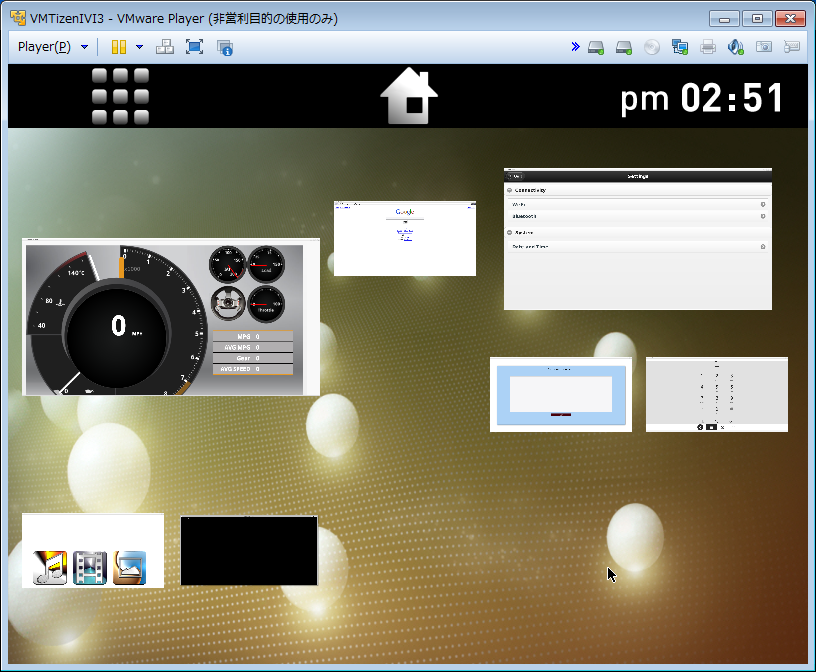
HomeScreen
(ico-uxf-homescreen 0.7 from IVI 3.0 M2-20130829 repository)
Appending 2013-12-19


(ico-uxf-homescreen 0.9)
Tuesday, June 4, 2013
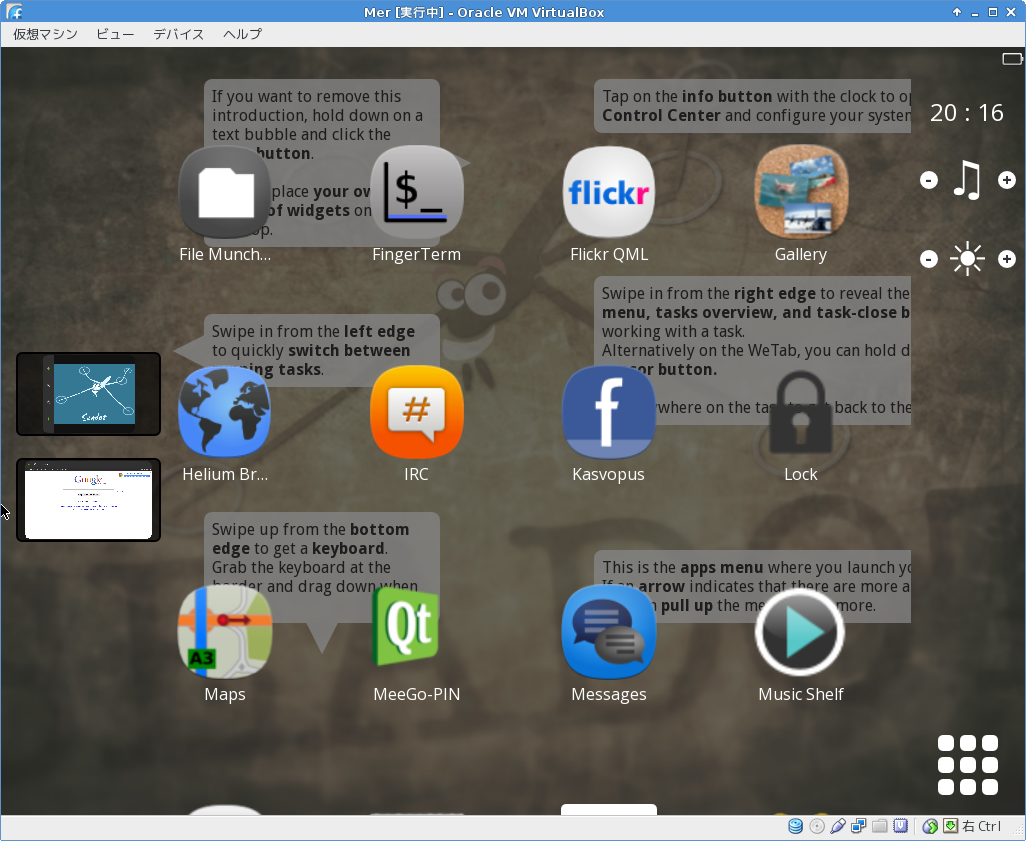
Nemo lipstick on VirtualBox Screenshots
My Japanese Blog "MeeGo, Mer" Category Link
I tried Nemo on VirtualBox 4.2.12.
Mer Architecture: i486.


I tried Nemo on VirtualBox 4.2.12.
Mer Architecture: i486.


Tizen 3.0 Snapshots on VirtualBox Screenshots
My Japanese Blog Article Link 1
My Japanese Blog Article Link 2
My Japanese Blog Article Link 3
My Japanese Blog Article Link 4
I tried Tizen 3.0 Snapshots on VirtualBox 4.2.12.
Use Environment
Host OS: Win 7 x64, Win XP
CPU: AMD Brazos(SSSE3), Intel Pentium D(nonSSSE3).
Tizen 3.0 Snapshots image Version: 20130529.9 wayland-i586.
I installed X, Enlightenment from repository
and updated from latest repository (except Systemd).
Mer and Tizen 3.0 Snapshots Dual Boot(Bootloader EXTLINUX)
Disk sda = Mer, sdb = Tizen

Enlightenment Splash Screen

Profile: Computer (Standard Enlightenment)

Weston Compositor on X

Profile: Mobile

My Japanese Blog Article Link 2
My Japanese Blog Article Link 3
My Japanese Blog Article Link 4
I tried Tizen 3.0 Snapshots on VirtualBox 4.2.12.
Use Environment
Host OS: Win 7 x64, Win XP
CPU: AMD Brazos(SSSE3), Intel Pentium D(nonSSSE3).
Tizen 3.0 Snapshots image Version: 20130529.9 wayland-i586.
I installed X, Enlightenment from repository
and updated from latest repository (except Systemd).
Disk sda = Mer, sdb = Tizen


Profile: Computer (Standard Enlightenment)

Weston Compositor on X

Profile: Mobile

Thursday, February 21, 2013
Seadot on VirtualBox
My Japanese Blog Article Link
I tried Seadot on VirtualBox 4.2.6 with fedora 18.
Mer Core Architecture: i486, i586.
Build Seadot on Nemo VM.


I tried Seadot on VirtualBox 4.2.6 with fedora 18.
Mer Core Architecture: i486, i586.
Build Seadot on Nemo VM.


Tuesday, April 10, 2012
Tizen 1.0 IVI Preview on ExoPC Photos
My Japanese Blog Link 1
My Japanese Blog Link 2
I tried Tizen 1.0 IVI Preview on ExoPC.


Navigation

Video Player


Calculator

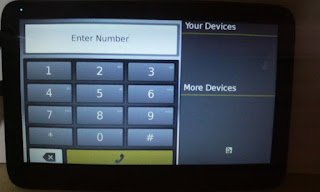
Dialer
Minehunt

Samegame

P.S. 2013-05-23
This article is very old.
This UX was used until 2012-06.
My Japanese Blog Link 2
I tried Tizen 1.0 IVI Preview on ExoPC.


P.S. 2013-05-23
This article is very old.
This UX was used until 2012-06.
Tuesday, March 20, 2012
Mer i586 on AMD Brazos Screenshots
My Japanese Blog Link 1
My Japanese Blog Link 2
Past Post Related Article 1
Past Post Related Article 2
Past Post Related Article 3
I created Mer i586 disk image with mic command.
Used Repository:
Mer Core i586 latest(0.20120315.1)
Nemo Mobile (i586)
Plasma Active Two (Mer Core next Trunk Testing i586)
Mer Tools (i586)
Processor:AMD Fusion APU Zacate E-350
Nemo Mobile


Plasma Active Two


My Japanese Blog Link 2
Past Post Related Article 1
Past Post Related Article 2
Past Post Related Article 3
I created Mer i586 disk image with mic command.
Used Repository:
Mer Core i586 latest(0.20120315.1)
Nemo Mobile (i586)
Plasma Active Two (Mer Core next Trunk Testing i586)
Mer Tools (i586)
Processor:AMD Fusion APU Zacate E-350


Subscribe to:
Posts (Atom)